
Load balancer and DNS
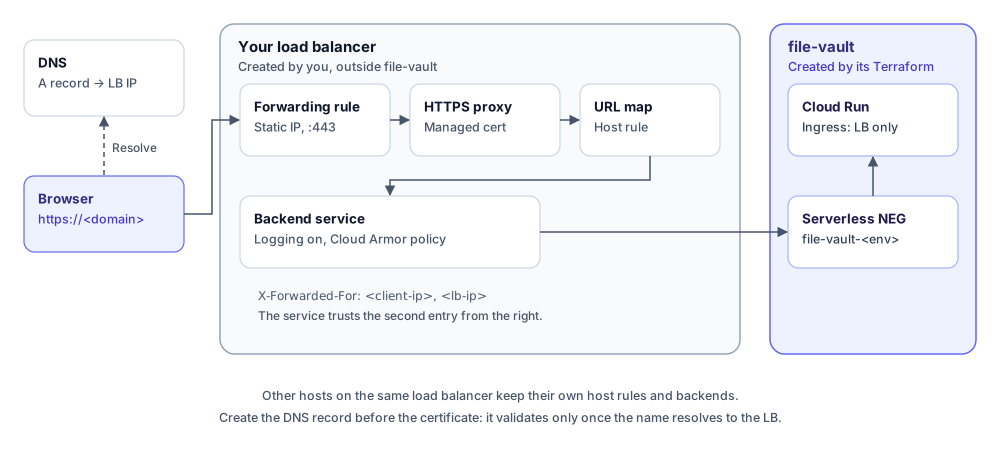
Terraform creates one serverless NEG for the service but never touches your load balancer. Attach the NEG to the external HTTPS Application Load Balancer you already manage. Every path goes to the same backend, so there are no path rules to maintain.
Get the NEG from the deploy job summary, or:
terraform -chdir=terraform/envs/prod output neg_idBoth the classic (EXTERNAL) and the global (EXTERNAL_MANAGED) external load balancers work. The NEG must be in the same project as the load balancer.
Backend service
Section titled “Backend service”PROJECT=your-gcp-projectREGION=europe-west9ENV=prod
gcloud compute backend-services create file-vault-$ENV \ --project=$PROJECT --global \ --load-balancing-scheme=EXTERNAL_MANAGED \ --protocol=HTTPS
gcloud compute backend-services add-backend file-vault-$ENV \ --project=$PROJECT --global \ --network-endpoint-group=file-vault-$ENV \ --network-endpoint-group-region=$REGIONLogging on the backend service is safe to enable: tokens and keys are in the URL fragment or in POST bodies, never in request URLs.
With Terraform, the equivalent is a google_compute_backend_service whose backend group is the NEG self link.
Host rule and certificate
Section titled “Host rule and certificate”gcloud compute url-maps add-path-matcher YOUR_URL_MAP \ --project=$PROJECT \ --path-matcher-name=file-vault-$ENV \ --default-service=file-vault-$ENV
gcloud compute url-maps add-host-rule YOUR_URL_MAP \ --project=$PROJECT \ --hosts=file-vault.example.com \ --path-matcher-name=file-vault-$ENVAdd a Google-managed certificate for the hostname to your HTTPS proxy. Managed certificates don’t support wildcards, so each hostname needs its own.
Point an A record for the hostname at the load balancer’s IP before creating the certificate. The certificate only validates once the name resolves to the load balancer, which takes 10 to 60 minutes.
Optional. If you enable Cloud CDN, use --cache-mode=USE_ORIGIN_HEADERS. The service marks hashed assets immutable, pages no-cache, and API responses no-store.
Cloud Armor
Section titled “Cloud Armor”Recommended for per-IP throttling at the edge, in front of the per-instance limiter in the service:
gcloud compute security-policies create file-vault-$ENV \  --project=$PROJECT --type=CLOUD_ARMOR
gcloud compute security-policies rules create 1000 \  --project=$PROJECT --security-policy=file-vault-$ENV \  --src-ip-ranges='*' --action=throttle \  --rate-limit-threshold-count=120 --rate-limit-threshold-interval-sec=60 \  --conform-action=allow --exceed-action=deny-429 --enforce-on-key=IP
gcloud compute backend-services update file-vault-$ENV \  --project=$PROJECT --global --security-policy=file-vault-$ENV
Client IP
Section titled “Client IP”The service reads the client address from the second-from-right X-Forwarded-For entry (TRUSTED_PROXY_HOPS=2), which is what the Google load balancer appends. If you put another proxy in front of the load balancer, raise trusted_proxy_hops in terraform/modules/app/variables.tf.
Verify
Section titled “Verify”curl -sI https://file-vault.example.com/ # 200, the upload pagecurl -s https://file-vault.example.com/api/config # JSON limitscurl -s -X POST https://file-vault.example.com/api/download/peek \ -H 'content-type: application/json' -d '{"token":"x"}' # 404, by design