
Deploy on Google Cloud
Deploys run from GitHub Actions. Every push to main builds the container image and runs terraform apply with it. Pull requests that touch terraform/ get a plan comment.
Nothing deployment-specific is committed. Your project, bucket, domain and state bucket live in GitHub variables and secrets, and locally in gitignored files.
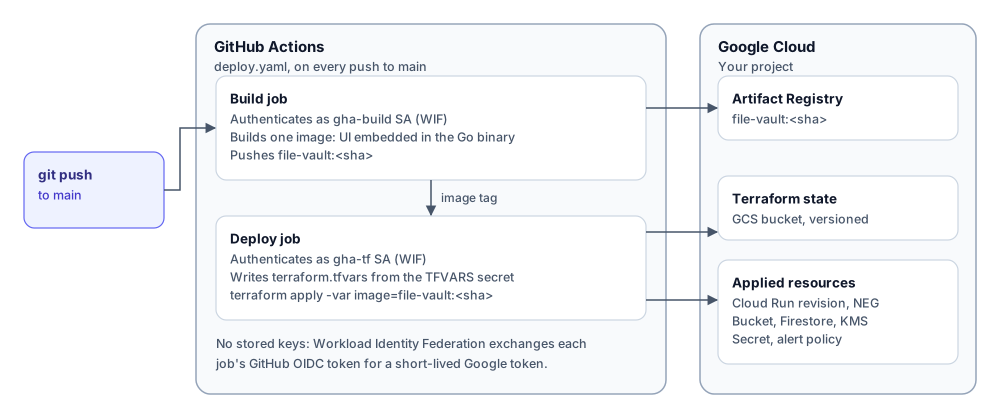
What gets created
Section titled “What gets created”| Resource | Purpose |
|---|---|
Cloud Run service file-vault-<env> |
The Go binary: UI and API. Ingress limited to the load balancer |
Serverless NEG file-vault-<env> |
What you attach to your load balancer |
| Cloud Storage bucket | Encrypted objects, CMEK, 7-day lifecycle, CORS for your domain |
Firestore database file-vault-<env> |
Shares, token hashes, audit events, with TTL. A named database, so it never touches your project’s (default) |
| Secret Manager secret | The HMAC pepper |
| KMS key ring and key | Bucket encryption |
| Log metric and alert policy | Email alert on bursts of rejected tokens |
Prerequisites
Section titled “Prerequisites”- A GCP project you own.
- An external HTTPS Application Load Balancer, or the willingness to create one. See Load balancer and DNS.
- A fork or copy of the repository on GitHub.
gcloud,ghand Terraform 1.6 or later locally.
Bootstrap CI access
Section titled “Bootstrap CI access”Run once, as a project owner:
cp cicd/setup.env.example cicd/setup.env # PROJECT_ID, GH_REPO_OWNER, GH_REPO_NAMEbash cicd/setup-gcp-wif.shThe script is idempotent. It creates:
- two service accounts:
gha-build-file-vault(pushes images) andgha-tf-file-vault(runs Terraform) - an Artifact Registry repository
- a versioned Terraform state bucket
- a Workload Identity pool and GitHub OIDC provider, if they don’t exist yet, and lets only your repository impersonate the two service accounts
It prints the values for the next step.
Configure GitHub
Section titled “Configure GitHub”Repository variables (Settings → Secrets and variables → Actions → Variables):
| Variable | Required | Value |
|---|---|---|
GCP_PROJECT_ID |
yes | your project |
GCP_PROJECT_NUMBER |
yes | printed by the bootstrap |
TF_STATE_BUCKET |
yes | printed by the bootstrap |
GCP_REGION |
no | default europe-west9 |
AR_REPO |
no | default file-vault |
WIF_POOL / WIF_PROVIDER |
no | default gitops-pool / gh-provider |
DEPLOY_ENV |
no | Terraform environment, default prod |
Then write your Terraform inputs and store them as the TFVARS secret of the prod environment:
cp terraform/envs/prod/terraform.tfvars.example terraform/envs/prod/terraform.tfvars$EDITOR terraform/envs/prod/terraform.tfvarsgh secret set TFVARS --env prod < terraform/envs/prod/terraform.tfvarsproject_id = "your-gcp-project"bucket_name = "your-gcp-project-file-vault-prod"domain = "file-vault.example.com"alert_email = "you@example.com"alert_email is marked sensitive, so plans and CI logs redact it.
Deploy
Section titled “Deploy”Push to main, or run the Deploy workflow by hand. The job summary shows the image tag and the serverless NEG. The smoke test at the end only passes once the load balancer routes your domain to the service.
Run Terraform locally
Section titled “Run Terraform locally”cd terraform/envs/prodecho 'bucket = "<your-state-bucket>"' > backend.hcl # gitignoredterraform init -backend-config=backend.hclterraform plan -var image=<region>-docker.pkg.dev/<project>/file-vault/file-vault:<sha>Troubleshooting
Section titled “Troubleshooting”| Symptom | Cause |
|---|---|
Error creating Database: 403 |
The Terraform service account lacks roles/datastore.owner. Re-run the bootstrap script |
Deploy job: Set the TFVARS secret |
The TFVARS secret is missing on the deploy environment |
| Upload fails in the browser with a CORS error | domain doesn’t match the hostname users load the UI from |
| Every request is rate-limited as one IP | A proxy sits in front of the load balancer; raise trusted_proxy_hops |