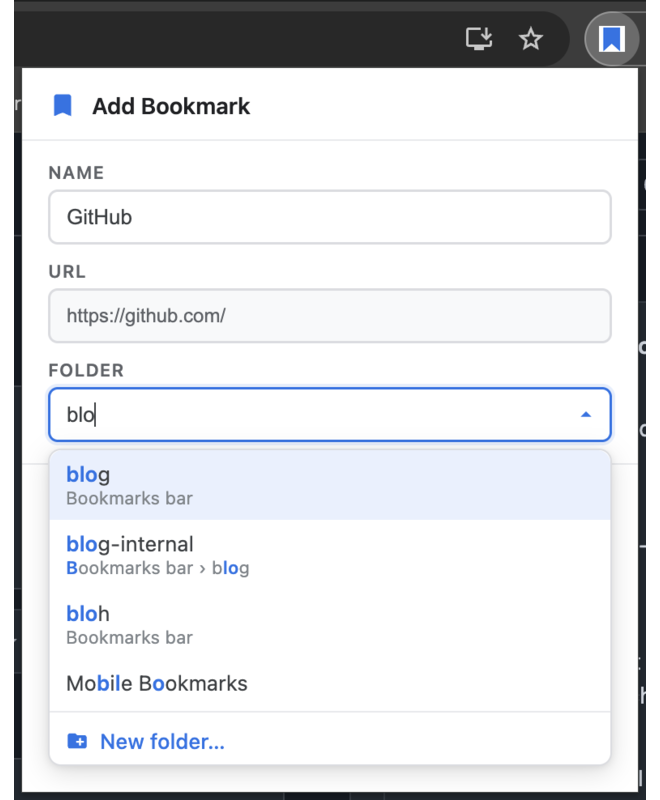
Chrome's bookmark dialog makes you scroll a flat list of every folder you own. This one lets you type. Fuzzy search matches folder names and full paths, anywhere in the tree.
MIT licensed · Manifest V3 · reproducible, attested builds · no tracking, no account
Fuzzy matching means the letters you type only have to appear in order — not consecutively, and not from the start. Three characters are usually enough to isolate one folder out of hundreds.
Everything happens in one small dialog, without leaving the keyboard.
Filters on the folder name and on its full breadcrumb path, so dev/front and dvfr both land on the same folder. Matched characters are highlighted.
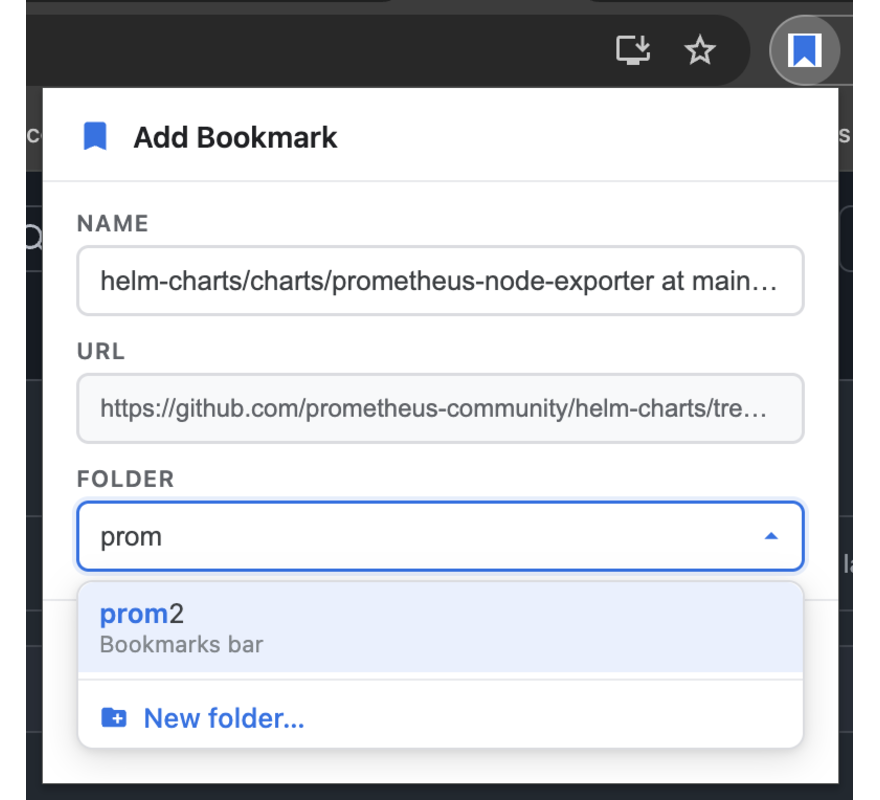
The dialog reads the page title and pre-selects the folder that matches it best. For pages you file repeatedly, the right folder is already there when the popup opens.
The folder you last bookmarked into is ranked to the top of the list, which makes a run of saves into the same folder a single keystroke each.
Open with your own shortcut, arrow through results, Enter to save, Esc to back out. The folder field takes focus on open, so you can start typing immediately.
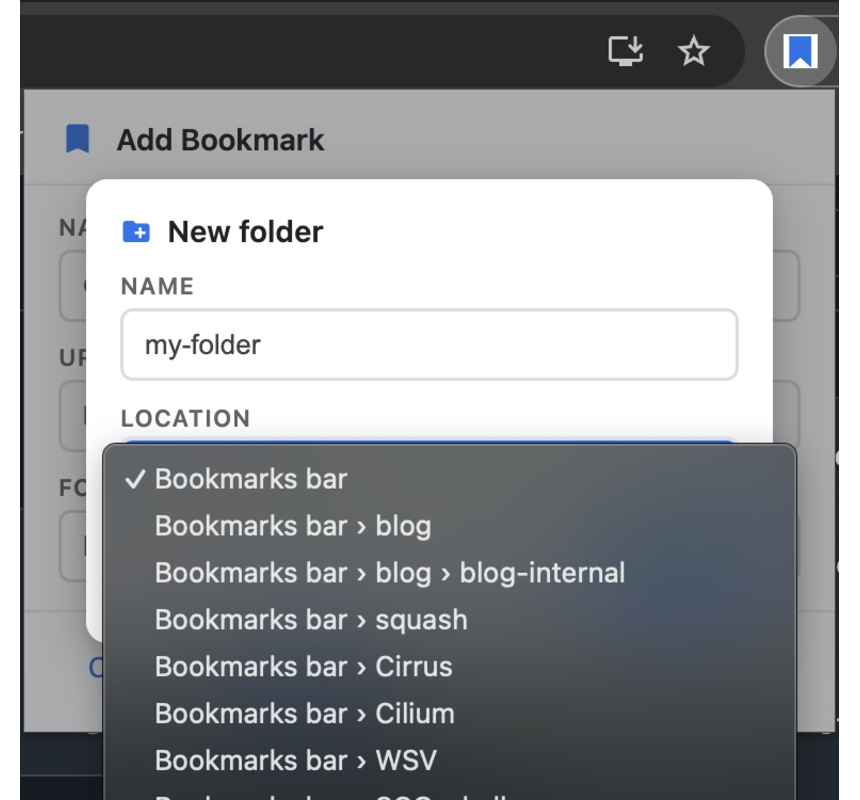
If nothing matches, create the folder from the same dialog — pick its parent from the full tree and it becomes the target for the bookmark you are saving.
Two permissions, both required to do the job: bookmarks to read and write the tree, activeTab to read the current page's title and URL — granted only for the tab you are on, and only at the moment you open the dialog. No host permissions, no analytics, no network calls.
The whole extension is one dialog. Here it is doing the three things it does.
You do not have to trust that the extension on the Web Store was built from the code in this repository. You can check it, in about a minute.
Every release is built by GitHub Actions from a tag and carries a signed build provenance attestation binding it to this repository, the commit and the workflow run.
$ gh release download v1.2.0 --repo bcollard/chrome-advanced-bookmarks $ gh attestation verify advanced-bookmarks-1.2.0.zip \ --repo bcollard/chrome-advanced-bookmarks
The build is reproducible, so you can rebuild it yourself and compare byte for byte.
$ git clone https://github.com/bcollard/chrome-advanced-bookmarks.git $ cd chrome-advanced-bookmarks && git checkout v1.2.0 $ python3 scripts/verify-reproducible.py advanced-bookmarks-1.2.0.zip OK: identical — the published artifact was built from this source
Any Python 3 on any OS produces the same bytes. The archive stores its entries rather than compressing them, so no compressor build and no interpreter version is part of the contract — a mismatch means the contents genuinely differ, not that your toolchain differs from the one CI used.
Why this is worth doing. The Chrome Web Store signs the
.crx itself, from a .zip the developer uploads. The
developer never signs anything, and nothing links the bytes you install to a
commit — so "the source is on GitHub" is normally an assertion you have to
take on faith.
Reproducibility plus attestation is what turns it into something checkable. It helps that there is no build step to reason about: the extension is unbundled, dependency-free vanilla JavaScript, so the code in the archive is the code in the repository.
The letters you type have to appear in the folder name in order, but they do
not have to be adjacent or start the word. Typing wpr matches
Work Projects, Weekly
Prep and WordPress. The
same matching runs against the folder's full path, so you can type a parent
folder's name to narrow down its children.
Not literally — Chrome reserves Ctrl+D at the browser
level and no extension can override it. Advanced Bookmarks suggests
Alt+D, and you can rebind it to any free combination at
chrome://extensions/shortcuts.
No. There is no service worker, no analytics and no network code of any kind. The source is a few hundred lines of dependency-free vanilla JavaScript, and you do not have to take on faith that it is what you installed — the published build is reproducible and attested. See also the privacy policy.
That prompt appears for anyone with Enhanced Safe Browsing switched on, for every extension that is not yet on Google's trusted list — which is where every small or recently published extension starts. It does not mean anything was found: it means Google has not yet vouched for it. Trust is granted on a track record of installs and time in the store, not through a review a developer can request, so it is not something this project can fix on demand.
You do not have to take either verdict on faith, though. Every release is reproducible and attested — you can confirm the code that runs in your browser was built by GitHub Actions from the tagged commit, and rebuild it yourself to compare byte for byte. That is a stronger guarantee than a trust badge, and it is checkable today.
Yes. It is a plain Manifest V3 extension using only the bookmarks
and activeTab APIs, so it installs and runs in Edge, Brave, Vivaldi,
Opera and other Chromium-based browsers that can reach the Chrome Web Store.
The dialog detects it, switches to edit mode, pre-selects the folder the bookmark currently lives in and shows a Remove button. Moving a bookmark to a different folder is the same fuzzy-search flow as creating one.